LinkedIn Job Tracker
Updated: Jun 20
Have you been exhuasted and tired to check the jobs again and again on linkedin, and found some of them are similar, but not sure they are the same jobs, or actually the jobs you have reviewed, applied, pending or rejected? No worries, the LinkedIn Job Tracker can help you, increase your job searching efficiency, and make job searching quicker and easier.

Remember if you have checked the same job
When you use Linkedin, the most efficient way is, you setup the search criteria, including the key words and where are these jobs, and also job posting time
In this job search window, you got filtered job summary on the left panel, and when you click one of the job, the job detail will be displayed at the right panel
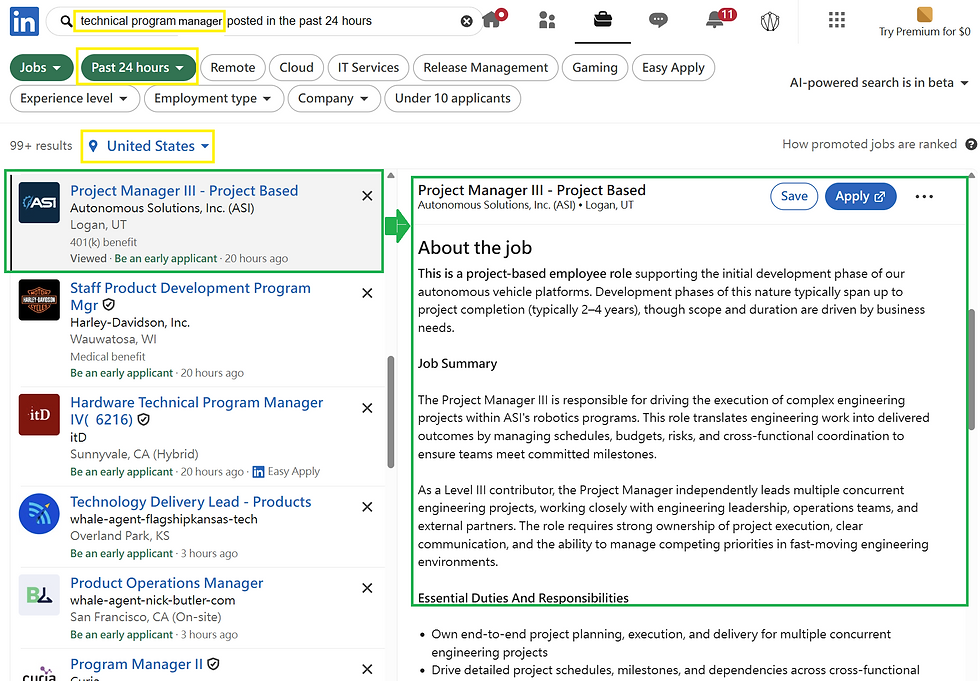
However you are not pretty sure if you have checked the same job because some of them may look quite similar, or it is actually the same job
LinkedIn Job Tracker Chrome extension helps you track the viewed jobs. If it is a new job you have never checked, the banner will show "New job saved to viewed history" with green color.

Instead, if you have clicked the job on the left panel before, the banner will show "Previously viewed job" in yellow color, so that you do not need to really look inside the job details in the right panel, spend your time and then eventually recognize that "oh I checked this job before already"
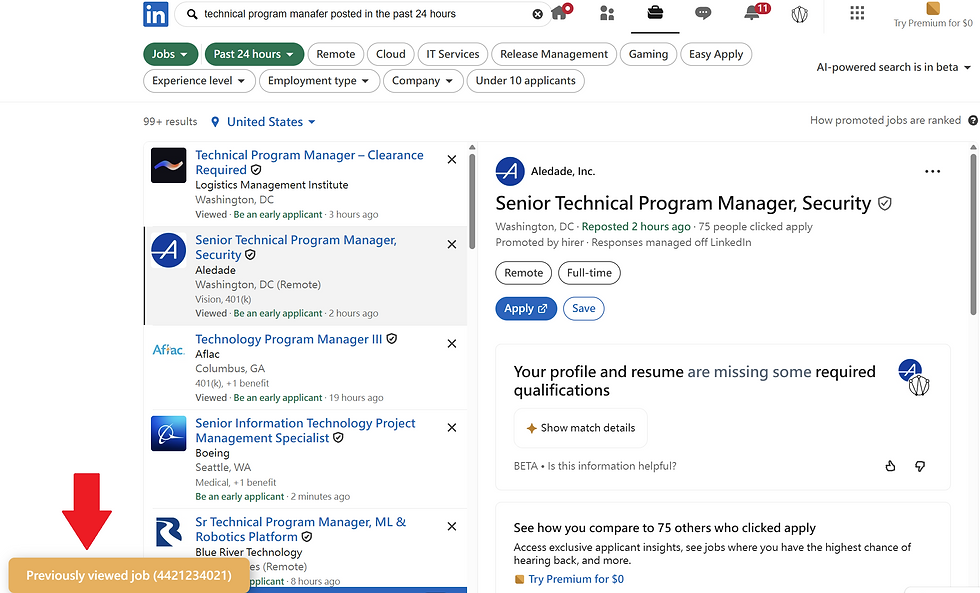
A function to let you fill in the job ID by yourself
Linkedin provides an unique job ID for each job. LinkedIn Job Tracker let you remark the job ID by a note file, so you can input the job ID for "applied job", "denial job" or "pending job" by your self for a personal record
In LinkedIn Job Tracker, you can assign this note location to the extension, and then the banner will show whether or not the job you clicked right now on the left panel belongs to one of aforementioned categories to tell you that do not waste time checking them again, go to the next one now.
The whole operation happens on your local computer including your applied job list, so there will be no private information leak to anywhere else on the internet
Step 1
Create a "note.txt" file in your specified local location, and contain three lines: "applied jobs", "denial jobs" and "pending jobs" respectively
Step 2
Copy and paste the job ID from the URL to be under one of the aforementioned categories. If you want to add more job IDs, just press enter and add a new one under the previous job ID of that category. Remember to save the file

Step 3
Load the note.txt file into the extension by left clicking the LinkedIn Job Tracker extension icon at the top right corner of Chrome, and then click the "Choose note.txt" button, navigate to the file location and select the note.txt file you created.

After the extension loads your file, the number under three categories will show up at the bottom of the dialog. If the number is not updated, click the "Refresh" button at the right side

Step 4
Right click on LinkedIn Job Tracker extension icon to select the target you want this extension to work with, and apparantly we need to select "On linkedin.com" as the correct target to work with

Step 5
Back to your LinkedIn job search page, refresh the website and done! Now you should be able to see the banner in red color about the applied, denial and pending jobs in your note.txt file if you click on those jobs on the left panel list from job search result


An accelerated way to make the job search even quicker and more confortable
If you use other extensions like "Highlight This: finds and marks words", which is able to make different color on the key words or their background, it is easier for you to screen the keywords within a short time. So you can imagine if you use LinkiedIn Job Tracker and the extension like "Highlight This: finds and marks words" at the same time, you will have extremly high efficiecy to screen out valuable jobs, you will never waste the time on checking duplucating jobs, also just need to have a glance at the colors of the keywords or their background color, you can decide if you need to read more details into this job, or jump to the next one. Furthermore, you can change your webpage background color to black using the extension like "Dark Reader". Job searching can take long time, so make your eyes more comfortable and away from excessive blue light emitted from the screen is important

Future works
"Highlight This: finds and marks words" currently has a 30-day trail. LinkedIn Job Tracker may include similar function in the next release, and more importantly, it will still be free to use. Our target is to support the people to find their job faster and easier, without spending additional money, and still keep every private data safely and locally in your computer, instead of transfering them to outside server for other purposes


Comments